Join different sports into one multisport activity
Run, strength, run again, each recorded as its own file? Join them into one multisport activity: one session per sport, in the order you did them.
The situation
Some workouts switch sport again and again: run, strength, run, strength, as in a Hyrox-style session. If your watch or app ends one activity and starts another at every switch, you finish with a pile of files, and none of them is the workout. The same happens when you are rebuilding a triathlon or duathlon from its individual files, or when you recorded each part separately because you did not know you could record it as one multisport activity.
The Split's Concatenate tool joins them. When the recordings are different sports, the joined file keeps one session per recording, each with its own sport, in the order you did them. Two files of the same sport become one activity instead, which is the subject of the guide linked below.
What you need
Two or more activity files, one for each stretch. Load the first two on the Upload screen, then add the rest on the Concatenate screen. FIT, TCX and GPX are all accepted, up to 15MB each, and the files do not have to be the same format.
Recordings must not overlap by more than 20 seconds, which The Split treats as ordinary clock drift between two devices. A break between them is fine: a minute or two between a run and the next block is the normal case.
The order you load the files in does not matter. The Split puts them in the order each one started.
Step by step
Drop the first file into the primary slot and the second into the secondary slot, then choose the Concatenate card. For every further file, use the dashed "Add another file" slot on the Concatenate screen. Each added file shows its sport, its length and its distance, and has a Remove button.
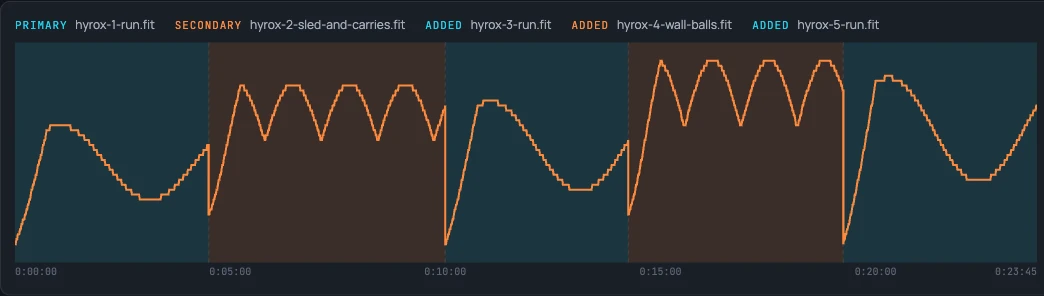
At the top, a bar shows the recordings in the order they were recorded, each labelled with its file name, and a legend gives each file's length and the total of all of them.

Click Concatenate & export. The Split joins the files, shows the result in a Joined file panel and downloads it. The file is named after the primary file with -combined added, for example hyrox-1-run-combined.fit.
Check the join before you export
Below the bar, a chart shows heart rate across all the recordings, and pace where there is one: it is the picture at the top of this page. Each file's stretch has its own background colour, with a divider where one ends and the next begins.
The chart draws the recordings back to back, so the minutes between them are not drawn, and the total beside the bar is the sum of the file lengths, not the time from the first record to the last.
What the joined file contains
Each recording becomes its own session with its own sport, in the order they were recorded, and the result card says Multisport. A session states only the figures its own recording measured: the runs state distance, pace and cadence, and a strength session states moving time and heart rate, because it has no distance or pace. A strength recording's sets are kept with it.
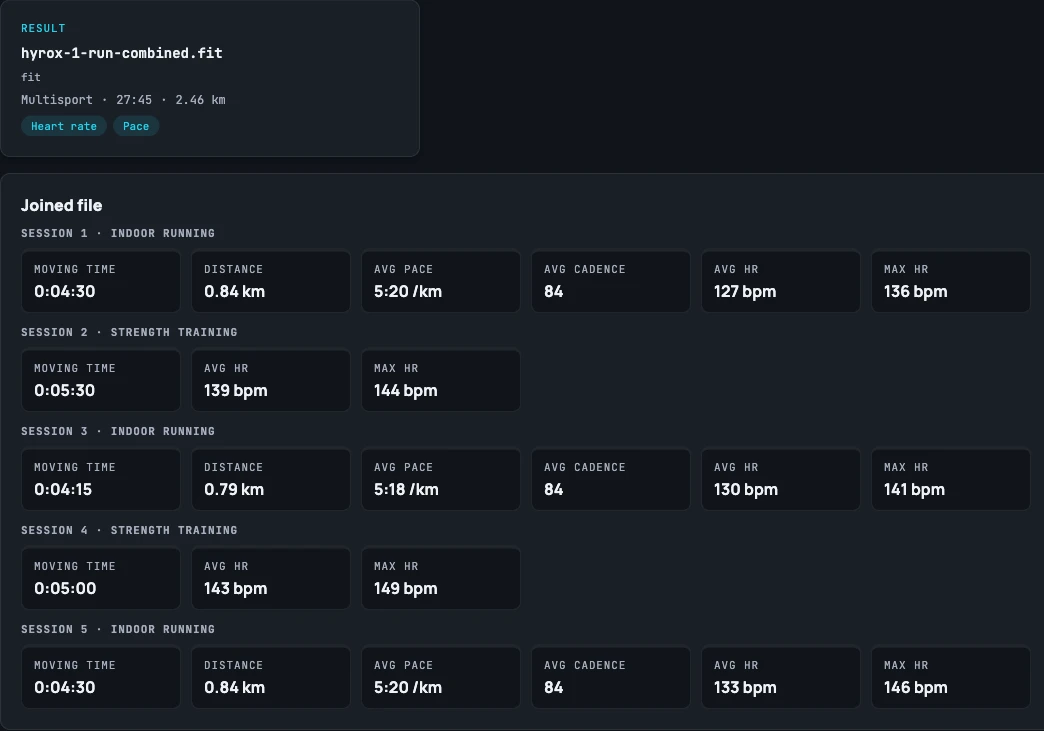
Every gap of more than a second between two recordings gets a rest lap. A rest lap states 0 moving time, because nothing was recorded across it. The gap counts in the joined file's elapsed time but not in its moving time. In the example above the file runs 27:45 from the first record to the last, while the five recordings add up to 23:45: the difference is four one-minute gaps.
The joined file keeps the earliest recording's device information and settings. The later recordings' device information and settings are not carried over.
How a platform displays a multisport file once you upload it is up to that platform.
Questions
- Can I combine a run and a strength workout into one activity?
- Yes, if they were recorded one after the other. Load the files, add any more on the Concatenate screen and choose Concatenate & export. The joined file keeps one session per recording, each with its own sport, so a run and a strength block stay separate sessions in one multisport file.
- Does the order I add the files in matter?
- No. The Split orders the recordings by when each one started, whichever order you loaded them in.
- What happens to the pause between two files?
- A rest lap is added across it, so no stretch is left uncovered. It states 0 moving time, so the pause counts as elapsed time but not as moving time. A gap of a second or less gets no rest lap.
- Can I join a triathlon or a duathlon recorded as separate files?
- The same way: the recordings of different sports each become a session, in the order they were recorded. If the watch ended an activity in the wrong place at a transition, the Multisport screen can move the boundary afterwards.
- Will my platform show the result as one multisport activity?
- The file states one session per recording. How a platform reads and displays that is up to the platform, and The Split cannot promise it.
- Can I merge files online without installing anything?
- Yes. The Split is a website: there is nothing to install and no account to create. Your files are uploaded to the server, held in memory only while you work with them, and deleted automatically after a short period of inactivity.