Merge two Garmin activities into one file
Two recordings, one after the other? Join them into a single activity file, and see which tool to use if your two files overlap.
The situation
"Merge" can mean three different things, and The Split has a separate tool for each. Pick the one that matches your files.
You stopped and restarted the recording, or one activity became two files, and you want a single activity: use Concatenate, which joins two recordings made one after the other. The rest of this page is about that.
Two devices recorded the same ride, for example a watch and a trainer or bike computer: use Merge, which brings data from one recording into the other.
You have a chest or arm strap's heart rate and want it in your watch's file: that is also Merge, in its heart-rate mode.
The two guides linked below explain each Merge case.
What you need
Two activity files, one for each slot on the Upload screen. FIT, TCX and GPX are all accepted, up to 15MB each, and the two files do not have to be the same format.
The two recordings must not overlap by more than 20 seconds, which The Split treats as ordinary clock drift between two devices. If they overlap by more, the Concatenate card on the Upload screen is greyed out. It says how long the two files overlap, which file to trim, and to use Merge instead if two devices recorded the same ride. The server applies the same limit and refuses a longer overlap with the same message.

Which file is in which slot does not matter. The Split puts the earlier recording first, going by when each one started.
A shorter overlap still goes ahead. Any record in the later file that falls at or before the earlier file's last record is left out of the joined file. When a record is left out, the joined file still has a total moving time: it is the two recordings' moving times added up, less the moving time that fell in the part left out. If a file states no moving time, its elapsed time is used for it. Calories are worked out the same way, and are stated when each file's calories can be accounted for.
Step by step
Drop your first file into the primary slot and your second into the secondary slot. Once both are loaded and do not overlap, choose the Concatenate card.
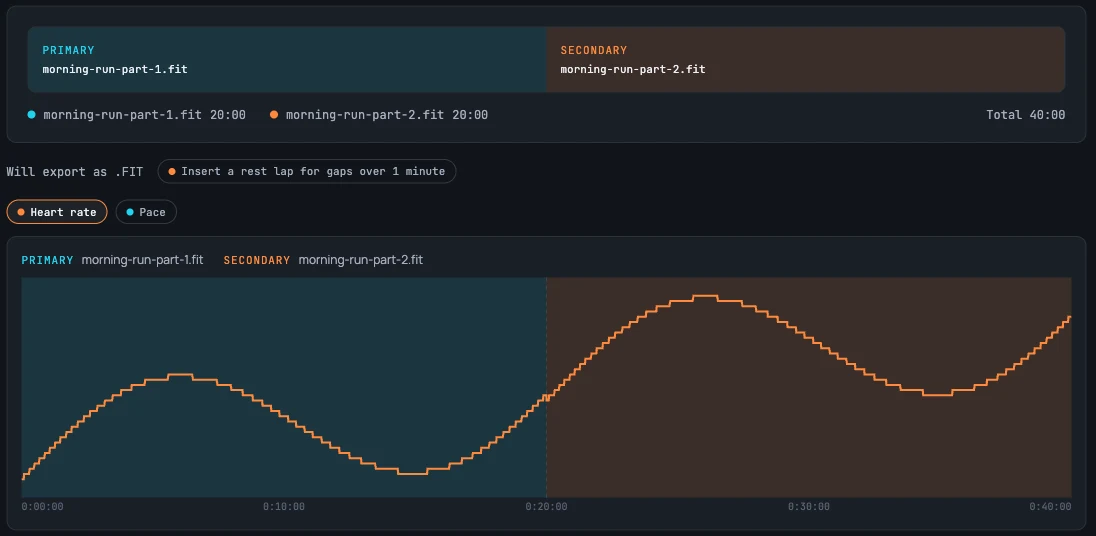
The Concatenate screen shows a bar with the two recordings in the order they were recorded, each labelled Primary or Secondary with its file name, and a legend with the length of each file and the total. The order always follows when each file was recorded, whichever slot it is in.
Below the bar, a note shows the format of the result. If both files are the same format it reads, for example, "Will export as .FIT". If one is FIT and the other TCX or GPX, two buttons let you choose "Export as" either format, and the joined file is exported in the one you pick.
Next to it is a toggle, "Insert a rest lap for gaps over 1 minute", off by default. Turn it on to add a rest lap across a gap of more than a minute wherever two laps are more than a minute apart, including the gap between the two recordings.
A preview chart below shows both recordings on one time axis, so you can check the join before you export. Then click Concatenate & export. The Split joins the files, shows the joined file's figures in a Joined file panel, and downloads the result. The file is named after the primary file, or, when the two formats differ, after the file whose format you chose, with -combined added, for example morning-run-part-1-combined.fit. If the download fails, a Retry export button repeats it without joining again.
What happens to the rest of your data
The joined file is one activity, running from the first record of the earlier file to the last record of the later one. It keeps the earlier file's device information and settings; the later file's device information and settings are not carried over. If the two recordings have different sports, the joined activity's sport is set to other.
Distance continues across the join. If the second file's distance counter starts again from zero, which is what a separate recording normally does, The Split carries it on from where the first file ended. One limit: if the second file's counter starts higher than where the first one ended, for example a file cut out of a longer recording, The Split cannot tell and leaves it as the file states, so the jump between the two counters is added to the distance.
Climb is not counted across the join: the step in altitude between the end of the first file and the start of the second is ignored. Averages such as heart rate are recalculated over the records of both files.
TCX and GPX files do not record when you paused the timer. If a lap in one of them ran across a pause, the joined file can show that lap shorter than it really was.
Questions
- Can Garmin Connect merge two activities?
- Not from the activity edit page. At the time of this writing, the edit page for a single-sport activity offered Trim Activity, Edit Intervals and Convert to Multisport Activity, and none of those combines two activities. Garmin changes its pages from time to time, so check yours.
- Can I combine two Garmin activities into one?
- Yes, if they were recorded one after the other. Load both files and choose Concatenate: the result is one activity running from the start of the earlier file to the end of the later one. If the two recordings overlap by more than 20 seconds, Concatenate is not available; see the next question.
- How do I merge two Garmin activities that overlap?
- Use Merge instead of Concatenate. Merge is for two devices that recorded the same ride, and it needs the two files to overlap by at least 80% of the primary file's duration. It keeps the base file's identity and brings in data from the other file. If the second file is a chest or arm strap's heart rate, use Merge in its heart-rate mode. If one recording simply ran on past where the other started, the Concatenate card tells you how long the overlap is and which file to trim: trim that much in Crop & split, then join the two. If one file lies entirely inside the other, it says so and suggests Merge, or cropping the outer file.
- Can I merge a FIT file with a TCX or GPX file?
- Yes. FIT, TCX and GPX files can go in either slot. When the two formats differ, the Concatenate screen offers an Export as button for each, and the joined file is exported in the format you choose. TCX and GPX files do not record timer pauses, so the limit described above applies to them.
- What happens to the gap between the two activities?
- By default nothing is added: the joined activity runs on from the end of the first recording to the start of the second, and the gap counts as elapsed time. When the two files do not overlap and both state their totals, the joined timer is the two recordings' timers added up, so the gap is not counted as moving time. To mark the gap, turn on "Insert a rest lap for gaps over 1 minute" and a rest lap is added wherever two laps are more than a minute apart, including the gap between the two recordings.
- Do the totals (distance, time, climb) add up correctly?
- Distance adds up when the second file's counter starts from zero, and climb is counted within each file but not across the join. If the two files do not overlap and both state their totals, the joined timer and calories are the two recordings' totals added up, and the gap is not counted as moving time. If they overlap and a record is left out, the part left out is taken off each total, so the joined file still has a moving time (and calories, when each file's calories can be accounted for). The other exceptions are the ones above: a second file whose distance counter starts higher than the first one's end, and a TCX or GPX lap that hid a pause.
- Can I merge two files online without installing anything?
- Yes. The Split is a website: there is nothing to install and no account to create. Your files are uploaded to the server, held in memory only while you work with them, and deleted automatically after a short period of inactivity.