How to merge your watch recording with your indoor trainer ride
If you run Zwift, MyWhoosh, Rouvy or TrainingPeaks Virtual and start your watch as well, you end up with two files for one ride and neither is complete. Here's what each one is actually good for, and what can and cannot be combined afterwards.
The problem
Indoor training platforms record your ride themselves, and plenty of riders start their watch at the same time. That leaves two files describing the same hour on the same trainer — and the obvious assumption, that one of them is simply the better copy, turns out to be wrong in both directions.
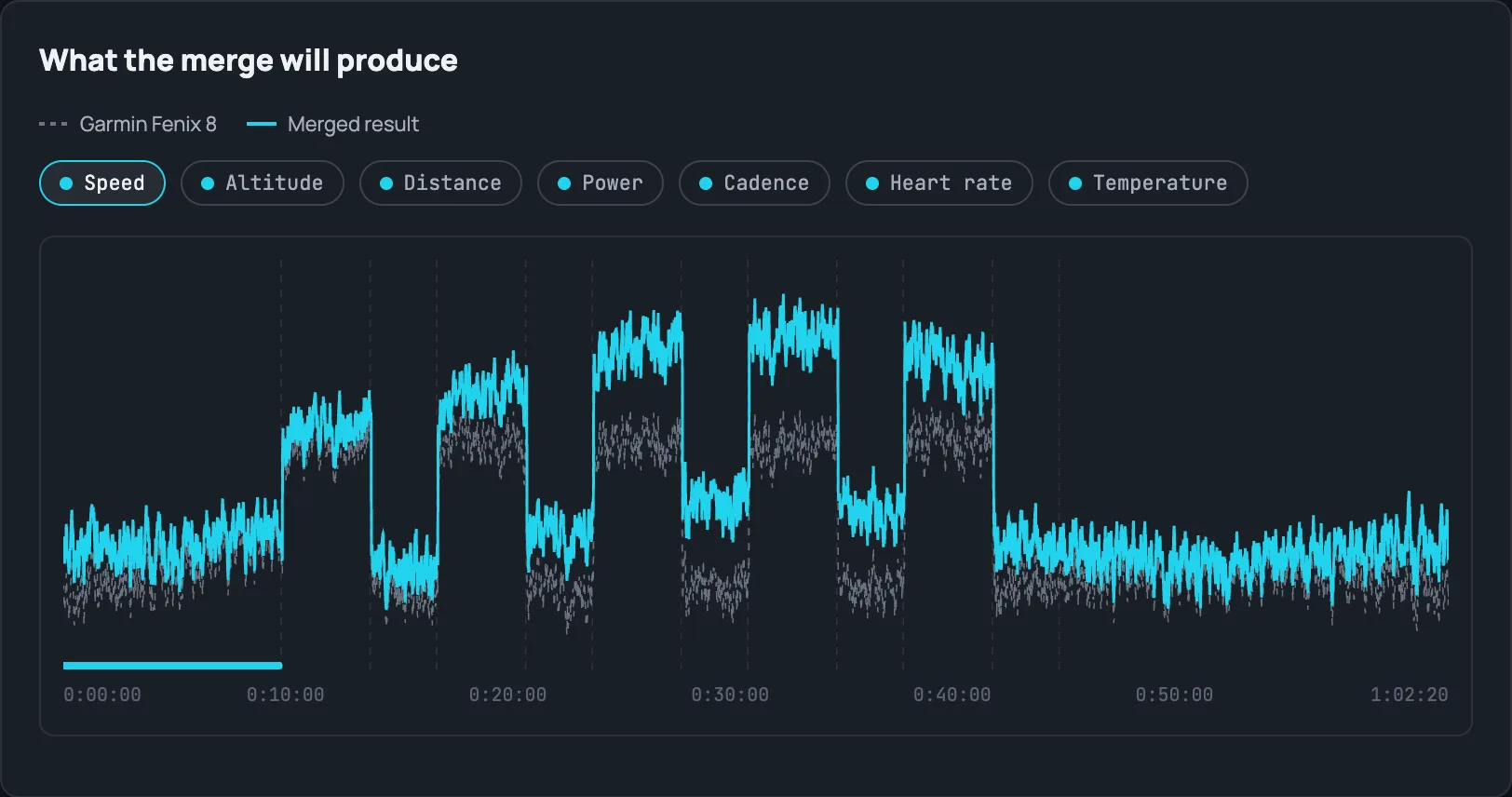
Start with distance, where the two files can disagree substantially. Neither is lying. The watch is reporting wheel-equivalent distance from the trainer, while the platform is reporting how far you travelled through a virtual world with its own gradients, drafting and physics. Because that simulation responds to terrain, the relationship between the two numbers shifts as the ride goes on rather than holding a steady ratio — so it is not a calibration error you could correct with a single multiplier, and how large the gap gets depends entirely on the course you rode. If you rode a route, the in-game figure is the one that matches it.
The platform usually holds the workout structure too. If you rode a structured session or an event, its intervals are laps in the platform's file, correctly placed — because the platform is the thing that was actually running the workout and driving the trainer's resistance. The watch has no such advantage regardless of how you've configured its own lap button or auto-lap distance: it has no idea what workout profile the platform was executing, so its lap boundaries — whatever produced them — essentially never land where the real intervals did.
Why the watch file isn't just a worse copy
The watch is usually recording things the platform never sees, because they come from the watch's own sensors rather than from the trainer. Depending on the model that can include respiration rate, wrist temperature, and running totals the platform has no equivalent for. If your watch supports a metric and your platform doesn't, that data exists only in the watch's file, and no amount of processing the platform's file will bring it back.
The opposite is also true, which is why neither file is simply the better one. The platform knows the virtual world; the watch knows your body and its own sensors.
Beware: more fields does not mean more data
If you merge these files yourself, the tempting rule is to prefer whichever file looks richer — whichever has more fields filled in. That rule will eventually cost you real data, because some apps and bike computers write a field they have no measurement for, rather than leaving it out.
Left/right pedal balance is the field this happens to most. A file can carry it on every single record, with a constant value and without the flag that says which leg the number even refers to. Structurally the file is perfectly valid and every tool will display the number without complaint — but it is a placeholder, not a measurement, and preferring that file overwrites a real varying one with a constant. Maintainers of FIT-parsing tools have documented the same non-compliant encoding in files from several popular apps and from mainstream bike computers alike. Others simply omit the field, which is the honest thing to do when you have nothing to put there.
It is worth knowing that a trainer-reported balance is an estimate even when it is real. Most trainers don't report it at all; among those that do, the figure is generally derived from crank position plus a single force measurement in the flywheel, not from measuring each leg. It is plausible in steady state and can swing wildly during transitions, and manufacturers don't publish an accuracy figure for it. Treat it as indicative rather than as a pedal-force measurement, and if you have dual-sided power meter pedals, trust those instead.
The general lesson: a file can be structurally complete and still be describing nothing.
The part you cannot fix afterwards
Metrics that describe the ride — Training Effect, training load, normalized power, TSS — are calculated from the ride data itself, so they survive whatever you do with the files later. Metrics that describe you do not.
Recovery and wellness metrics — Garmin's Body Battery, all-day stress, heart-rate variability, and the equivalents on other brands — are computed continuously on your wrist while you wear the watch, and they reach your account by a separate route from any activity file. If the watch wasn't recording, those hours show no training effort at all: the curve simply drifts through the ride as though you were sitting still. Uploading a file afterwards cannot reconstruct it. The watch either sensed those hours or it didn't.
So for an indoor ride, the decision is made at the start: either the watch records the session, or that stretch of your wellness data is simply missing from the day.
"A number surviving the ride" and "a number surviving your merge" are different promises
The section above says Training Effect, normalized power and TSS "survive whatever you do with the files later" because they're computed once, at recording time, from data that already exists. That's true of the device — but the moment a tool starts editing the file afterward (cropping it, splitting it, or swapping which device's power stream is authoritative in a merge like this one), those numbers describe a stretch of data that may no longer be what's in the file. A calorie total computed for a 3-hour ride doesn't magically stay correct once you've cut the file down to 30 minutes.
The honest options at that point are: recompute it properly, or admit it's no longer trustworthy and say so rather than exporting a stale number as if nothing changed. The Split does the former wherever it genuinely can — calories are recalculated from your power data (or, failing that, honestly redistributed by how long you were actually moving) after any crop, split, or same-ride merge, rather than silently disappearing or silently staying wrong. Normalized power and TSS follow the same principle: recompute from the real power data in the merged file rather than trust a number that described a file which no longer exists in that shape.
What this means in practice
If you care about the ride's route, distance and workout structure, the platform's file is the one to trust. If you care about your body's data for those hours, the watch has to be running — and that means running properly, as a recorded activity.
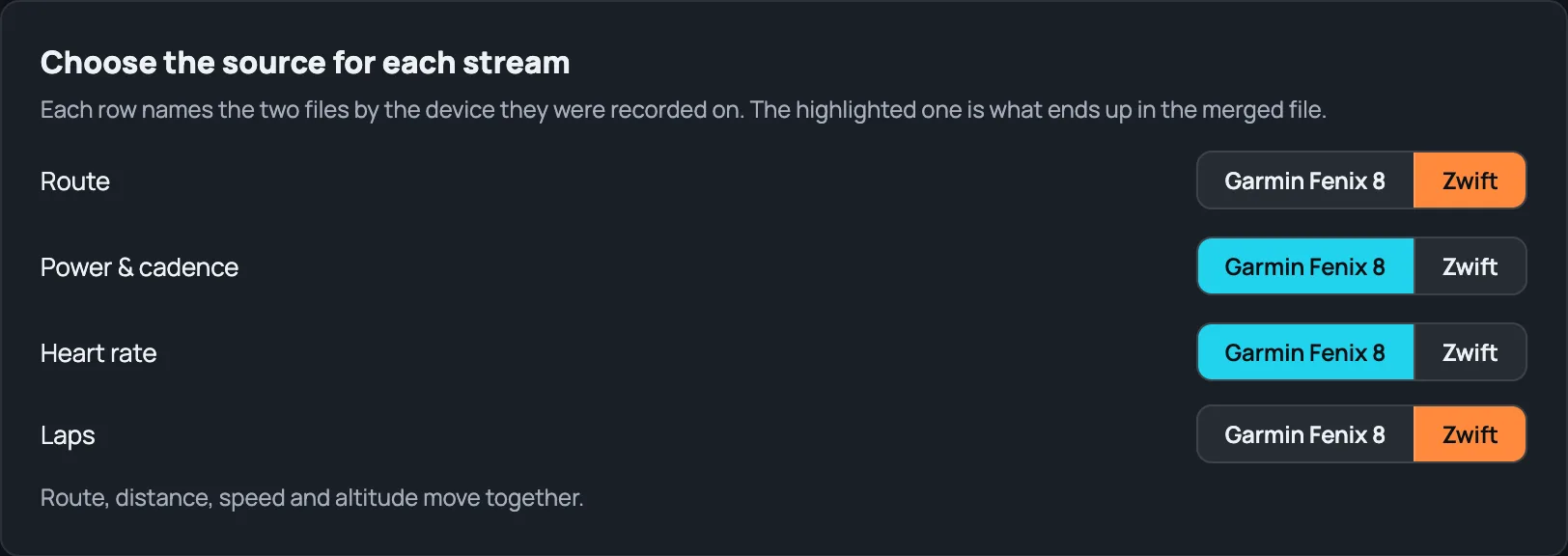
The Split now does exactly this: merge a watch recording with a platform recording of the same ride, rather than just leaving you to keep both and remember which is which. You choose which device is the base — the one whose identity, proprietary data and lap structure the merged file keeps — and the tool suggests one for you based on which file looks like the real device recording (richer background data, real device identity) versus which looks like a platform export. From there it's a field-by-field choice, not all-or-nothing: distance, speed, altitude and position move together as one unit from whichever source you pick (they have to, or the file's route and its stated distance would contradict each other), while power and cadence can be chosen independently, since both devices are listening to the same physical sensor there anyway. Clock drift between the two devices is estimated automatically from matching power patterns, with a manual override if you know better. And the placeholder-value trap this article warns about above is handled structurally, not just by warning about it: fields with the exact shape of that problem — a constant value with no real measurement behind it — are never eligible to be pulled in automatically, no matter which platform wrote them or which device you pick.