How to fix a FIT file by asking an AI assistant (no code)
No code: connect Codex, Claude Code or Antigravity once, say what went wrong, confirm each fix. Your original is never changed.
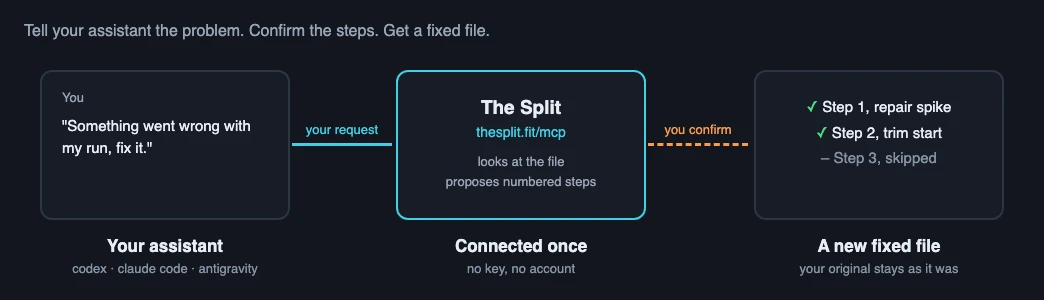
What you get
If you use an AI assistant that runs in your terminal, such as Codex, Claude Code or Antigravity, you can connect it to The Split and fix your activity files by describing the problem in a sentence. This is done through something called an MCP server, which only means that the assistant gets The Split's tools built in, so you do not have to know how they work.
The assistant looks at your file and tells you what it found. It then proposes numbered steps, each with a plain reason, and applies only the ones you say yes to. Your original file is never changed: the result is a new file, and the assistant gives you a link to download it, together with a comparison of before and after. There is no account to make and no key to copy.
Connect it once
Paste the command for your assistant into a terminal. All three use the same address, https://thesplit.fit/mcp, and you only do this once.
# Claude Code
claude mcp add --transport http thesplit https://thesplit.fit/mcp

# Codex
codex mcp add thesplit --url https://thesplit.fit/mcp

# Antigravity
agy mcp add thesplit https://thesplit.fit/mcp
Then check it worked. In Codex and Claude Code, start the assistant and type /mcp to see The Split in the list. In Antigravity, run agy mcp list. After that, tell the assistant where your file is, for example ~/runs/saturday.fit, and describe the problem. It reads the file on your computer and sends it to The Split for you.
Four things you can say
These are the four jobs The Split's tools are built for. Say it the way you would to a friend; the wording does not need to match.
"Something went wrong with my run, fix it." The assistant looks for heart-rate spikes, where the reading jumps to a wrong but believable level and snaps back, and for time recorded after you stopped moving, such as a watch left running at the start or end. It proposes repairing or trimming them. If you know roughly where a problem is, say so, for example "around minute 20". Gaps where the heart rate dropped out cannot be filled in, and the assistant will tell you so.
"Combine my watch file with my heart-rate strap file." Give it both files. It works out which one is the base and how far apart the two clocks were, then shows what the merge will change, including the heart rate it would take from the other file. The same works for a watch recording and an indoor trainer recording of one ride. Merges have been checked on a limited set of device combinations, so look at the result.
"Fix my triathlon file." The assistant lists the legs and checks whether a separate recording, such as one from a bike computer, matches one of them and could replace it. If you give it the official split times, it proposes moving the transitions to match. It cannot split one recorded session into several.
"My watch stopped halfway, join the pieces." Give it two to five files. It puts them in time order, checks that each follows the one before, and proposes joining them into one activity. Pieces of different sports become one multisport file.
Check each step before you say yes
Nothing that changes your data is applied until you confirm it. The assistant shows each proposed step with the reason for it, and what it will change or clear, and you answer yes or no to each one. A step it is unsure about is offered unticked.
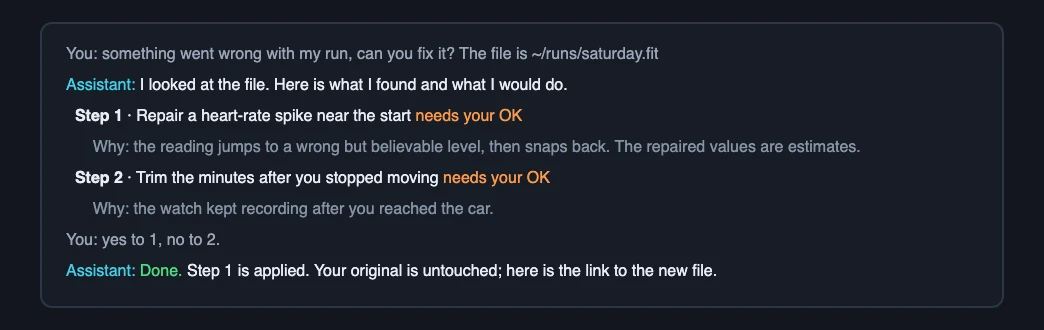
Repaired heart-rate values are estimates, not measurements. And not every sudden change in heart rate is a sensor error: if a jump came at rest, with dizziness or chest discomfort, or keeps happening, see a doctor. The Split edits data; it does not diagnose anything.
Limits, in plain words
Your files are uploaded to The Split's server and held in its memory only; they are never written to disk. Each file and each result is discarded 30 minutes after it was last used, 2 hours after it was created at the latest, or straight away when the assistant deletes it. Ask it to delete your files when you have downloaded the result.
One address can hold 12 files at a time, results included, and each file can be up to 15 MB. If The Split asks the assistant to wait, it says for how long; waiting is the right answer. The download link works until the file expires, so save the result when you get it.
If you use a chat app instead
Chat apps such as ChatGPT, Claude's website and Gemini can connect to servers like this one, but at the time of writing they cannot pass a file you attach on to a connected service. Without the file there is nothing for The Split to fix, so for those apps use the website, where you can drop the file in directly.
When to use the site instead
For one file, the site is often quicker. It is also the better choice whenever you want to see what you are doing: spotting a spike on the chart, lining up a strap and a watch by eye, or dragging a crop to exactly where you stopped.
If you are a developer, or want an assistant to work through a whole folder with calls you can read and check, see the developer page and how to fix a folder of FIT files at once. For the same jobs by hand on the site, see Fix a heart rate spike on a Garmin watch, Merging Garmin FIT files with Polar heart-rate data and Splitting, cropping, and joining activity files.
The Split is free to use. If it saves you an evening of clicking, the supporter wall is where you can help pay for its hosting.